Ask havn is the helper inside havn. Anyone can ask it how havn works. If you run a server, you can also tell it what you want changed, in plain words, and it makes the change.
It runs on Claude Haiku 5.5, the smallest and cheapest Claude model. A thousand messages cost about €2.20 (see the full cost breakdown). People have sent it thousands so far, and havn gives it to everyone for free.
This is how it's built, and what each part costs. Ask havn is my example, but the principles work for any product that wants an agent inside it. Each section starts with the principle, then shows how it played out in havn.
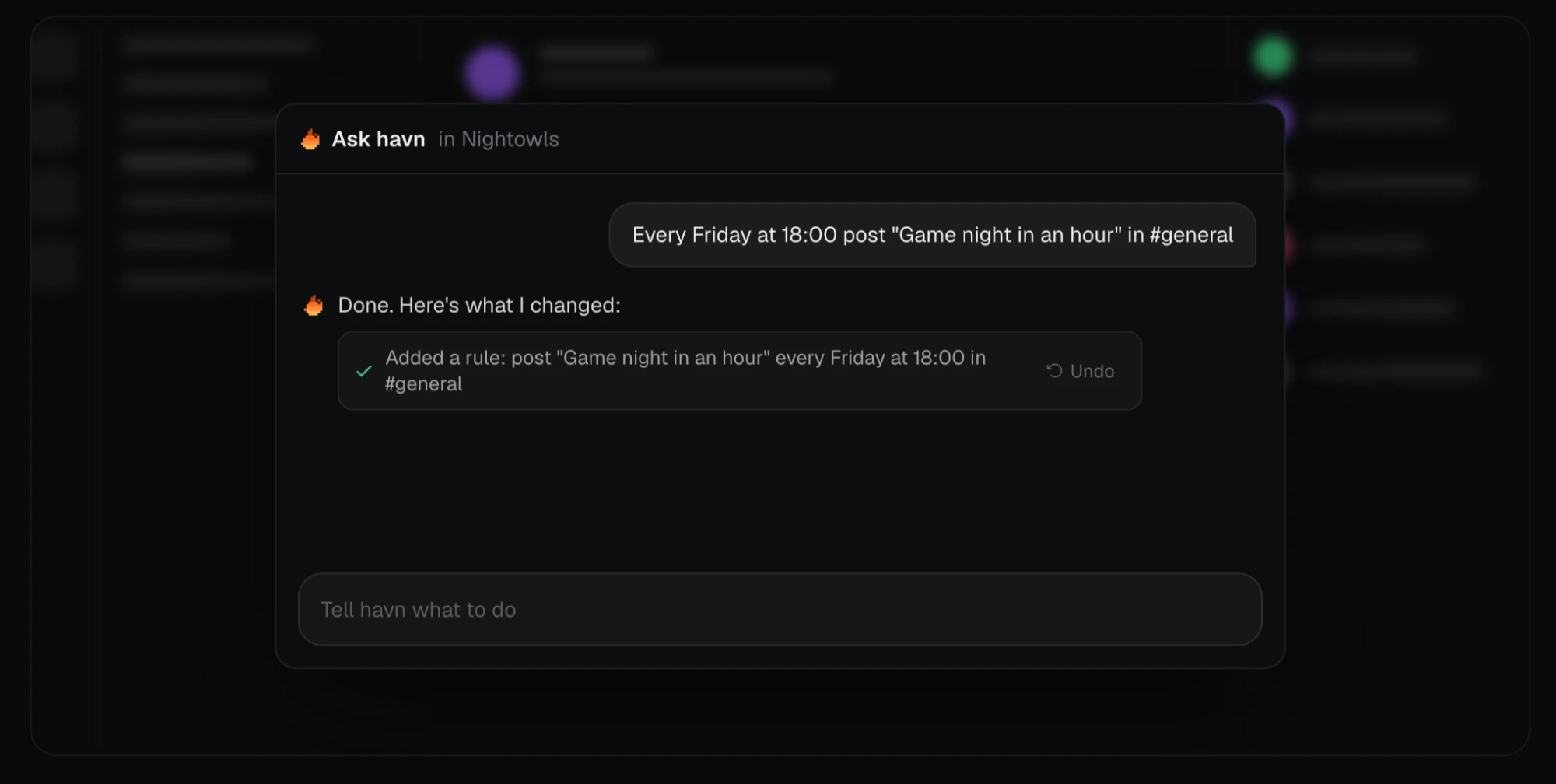
Build the product so a model can run it
Before you add an agent, make every setting in your product something a tool can change in one call.
The agent is the last step. From the start I built havn with switches and settings that a model can change easily. Most of what a server needs is one setting or one rule.
Setting up a server by hand means a lot of trips into Server settings. You make roles and give them powers. You make channels and pick who sees each private one. You write the welcome message and set up automod. Each of those takes several clicks.
With Ask havn it's one request: "Set up a gaming server with channels per game, a few voice rooms, a #rules channel and a #looking-for-group."
You could set up a whole server in one message. But that's rarely how it goes. The real win is everything after: getting started, remembering the thing you forgot, changing your mind, trying again. Members need a role, mods need different powers, someone needs a timeout, a channel should be read-only. You do all of it from the chat, without hunting through menus.
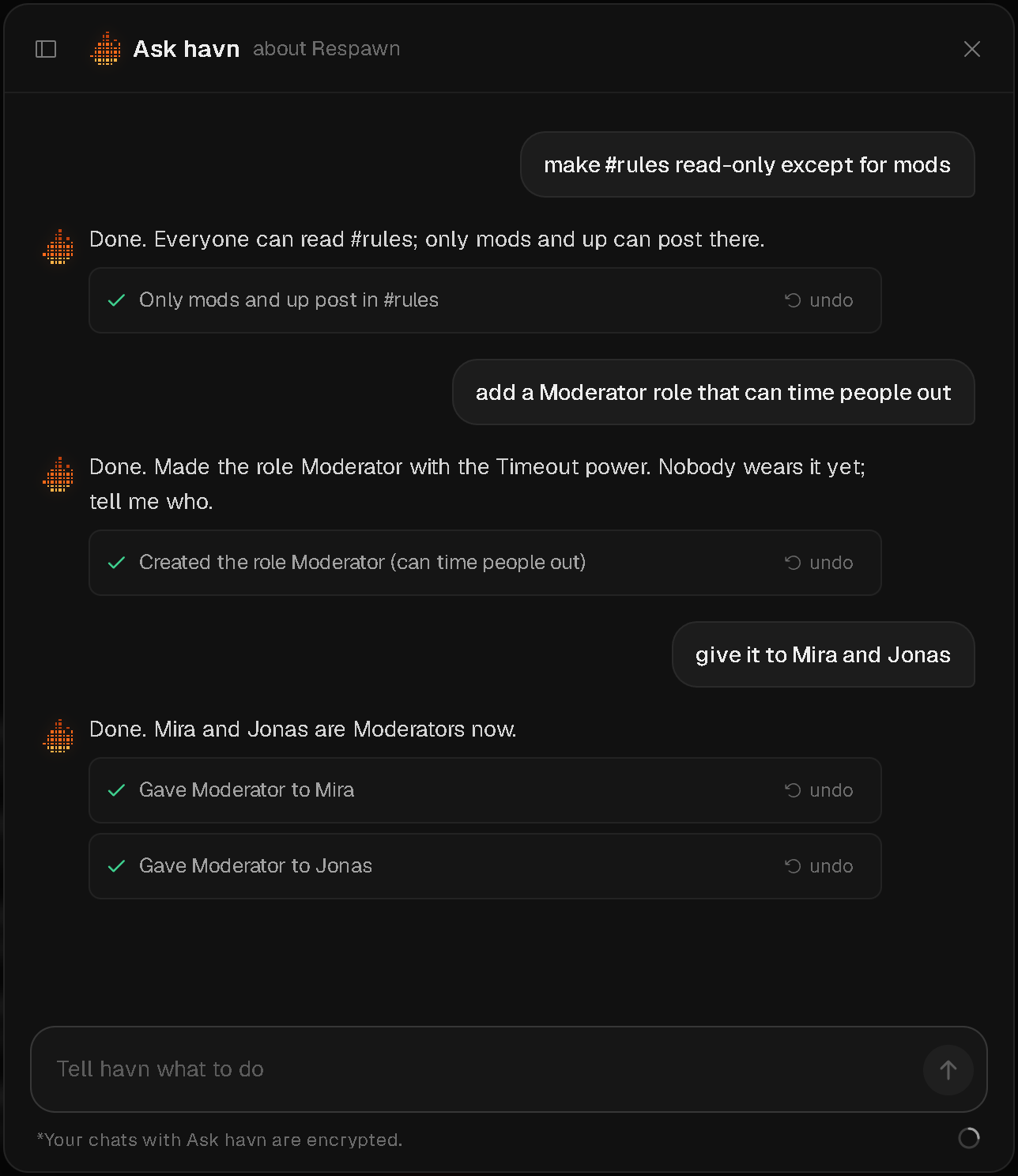
Ask havn has 39 tools. Each one does one thing the settings screens do: create a channel, pick which roles see a private channel, create a role with its powers, time someone out, create a rule, switch Levels on, post a poll. It only changes servers you run.
Give it one building block
When many features share one shape, the agent needs far fewer tools, and has fewer ways to get it wrong.
Modules show this best. Every server on havn gets them, for free. They cover the things servers usually add a bot for: Welcome, Auto roles, Automod, Timeouts, Reaction roles, Timed messages, YouTube alerts, Levels, Polls, Commands and Custom rules. In Server settings, each one is a card with a switch and a Set up window.
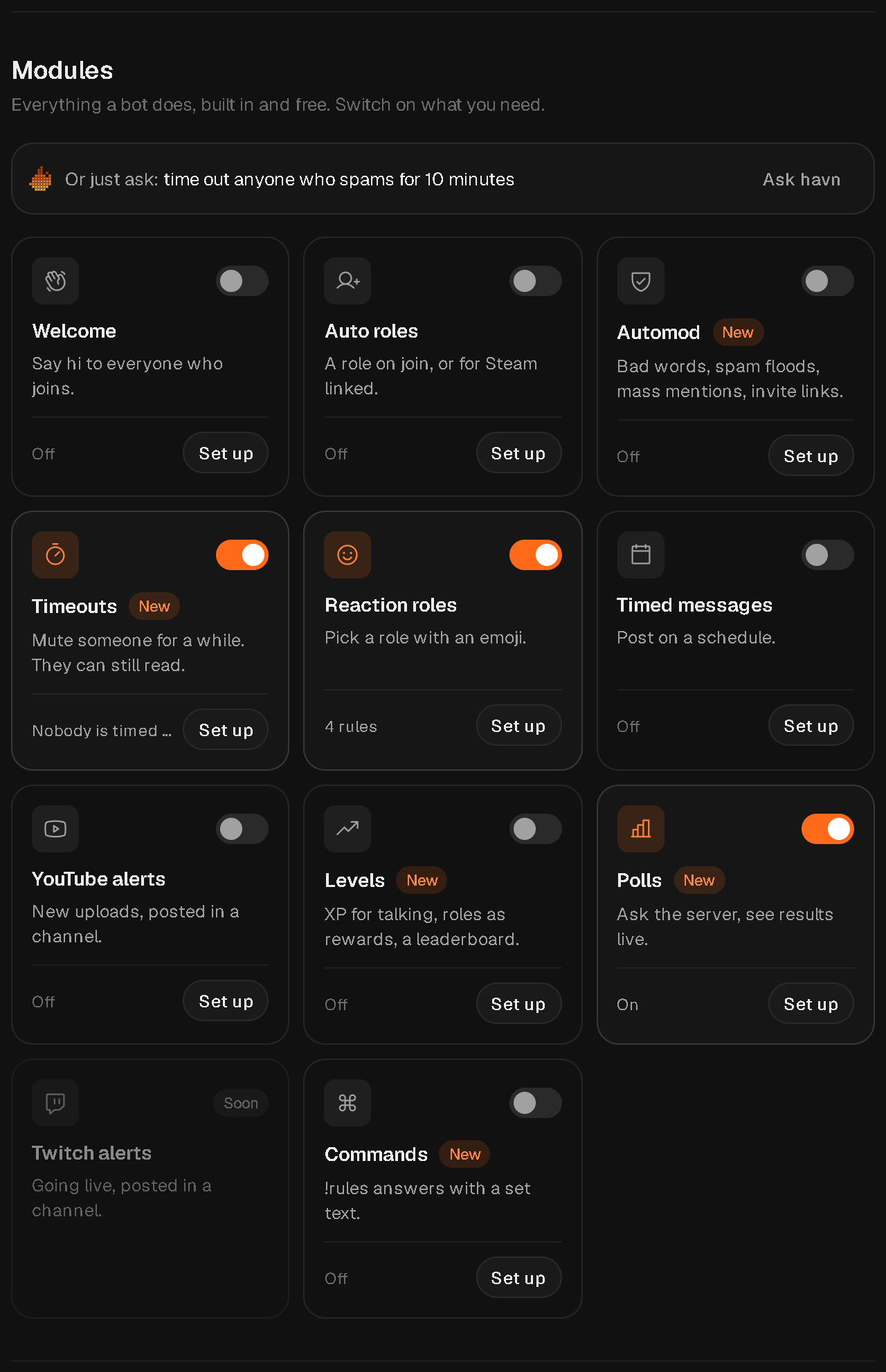
Most of them are the same thing underneath: a rule. A rule has a trigger (someone joins, a message, a reaction, a schedule, a new YouTube video), some conditions, and one to five actions (post, give or remove a role, delete, pin, react, time out). Rules run inside the database, as the havn account. Each rule carries the name of its module, so the card's switch turns all its rules on or off together. Levels, Polls and Timeouts are plain switches on the server.
Because it's one building block, Ask havn needs only four tools for all of it: create_rule, update_rule, update_modules and set_level_reward. One sentence is enough:
- "Welcome new people in #general" becomes a Welcome rule.
- "Time out anyone who posts 5 messages in 10 seconds" becomes an Automod rule.
- "When someone types !ip, answer with the server address" becomes a command.
- "Post the event reminder every Thursday at 18:00" becomes a timed message.
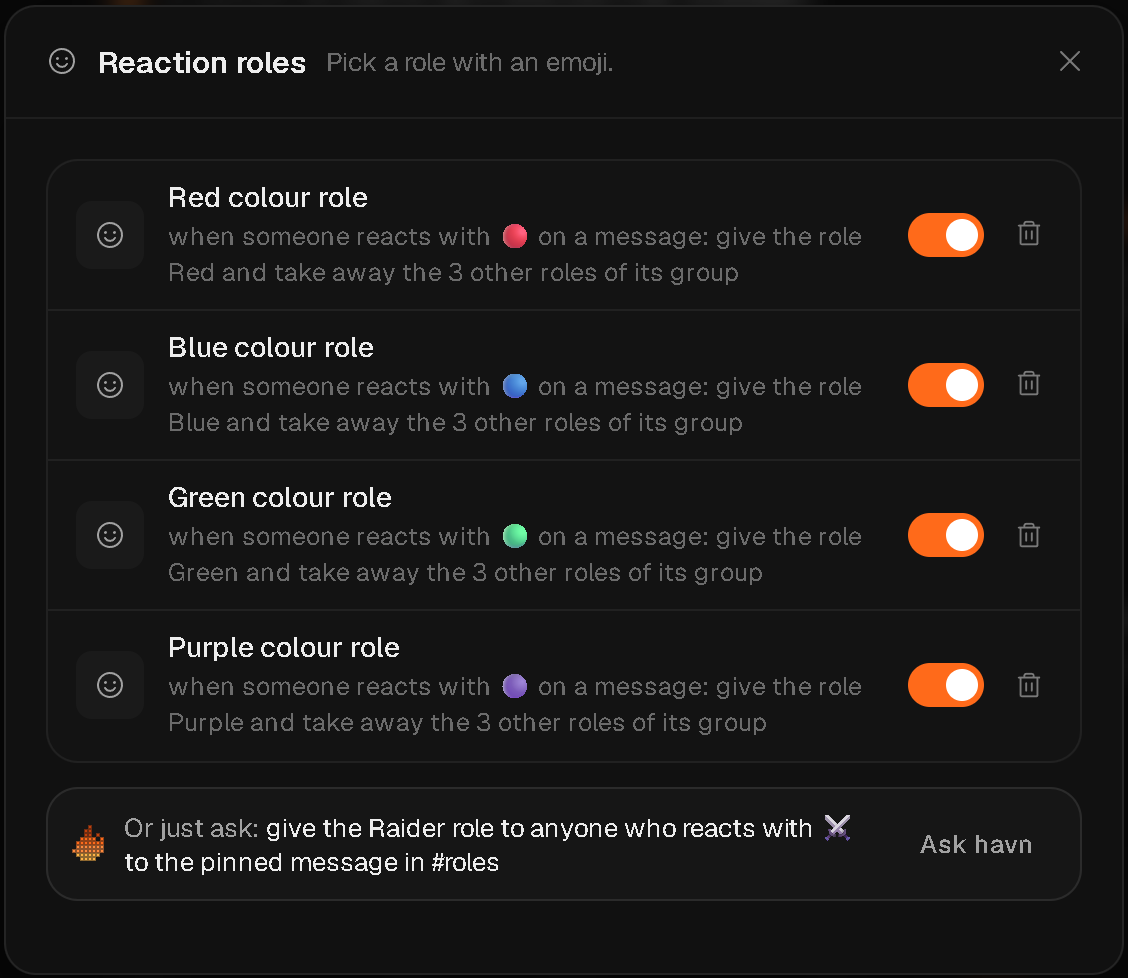
- "Let people pick one colour role with an emoji" becomes reaction roles: one rule per role, and each one takes the other colour roles away, so a person keeps only one.
That last one is a good example. You can set up reaction roles by hand, but asking is a lot easier. Whatever Ask havn sets up shows in its module's card, so admins can check it and change it by hand. Log history shows what each rule did, for 30 days.
Use the smallest model that does the job
A narrow job doesn't need a big model. Run the small one and the big one on the same tests, and let the results pick.
I weighed quality against cost, and for this job Haiku wins.
A small model works because the job is narrow. It needs to know havn, pick the right tool and fill in the right fields. Everything around it does the rest: tight tools, one guide, short limits and checks on every reply (all below). With that in place, Haiku gives the same quality of output as a bigger model, without the cost.
The cost is easy to see. Every request carries about 68,000 tokens of tools and guide. Here's the same work on Haiku 5.5 and on the two bigger models:
| Haiku 5.5 | Sonnet 5.5 | Opus 5.5 | |
|---|---|---|---|
| One question, cached (68,400 tokens) | €0.0008 | €0.009 | €0.019 |
| One change, cached (4 calls, 278,400 tokens) | €0.0032 | €0.038 | €0.076 |
| 1,000 messages | €12 | €230 | €460 |
| 1,000 messages, with caching | €2.20 | €32 | €64 |
| As expensive as Haiku | 1× | about 15× | about 29× |
All that extra cost buys no improvement in results, because of proper engineering. (Full breakdown below.)
My test script runs the same cases on Sonnet and Haiku and compares pass rate and cost. That's how I picked Haiku. I build and tune the test cases with Sonnet or Opus. So when an update I push brings in a mistake, the cases catch it and I correct it before the live version, on Haiku, goes out. The model is one setting (AGENT_MODEL), so I can switch it without touching code.
Write one guide, for people and the agent
Describe each feature once, in the pages your users read, and give the agent that same text. A fix then reaches both at once.
Ask havn answers from one text, the guide. It has two parts:
- The feature pages from havn.gg/features, as plain text. People read the same pages on the site.
- havn.md, with what only the agent needs: what it can and can't do itself, what doesn't exist in havn, the limits.
A script joins them into one file, guide.ts. So each feature is described in one place, and a fix to a feature page reaches people and Ask havn at once.
Every time we ship something people can see, we update the guide in the same commit, then deploy the agent, which rebuilds the guide first. A check fails when guide.ts is behind.
The whole guide goes with every request, so every line costs a little on every message and slows each reply a bit. Everything costs, so every line has to earn its place.
That doesn't mean small. It grew on purpose:
- Oct 16: about 4,500 characters, written by hand.
- Oct 20: about 14,000.
- Later that same day: about 123,000, when I folded in the public feature pages. From then on, how-to text exists only once, in the pages people read. The agent's own file only holds what's specific to the agent.
- Today: about 175,000, as features shipped.
So "short" means something specific: no repeats, plain short sentences, nothing that isn't about how havn works, and button names sent only for your language. guide.ts itself is about 335,000 characters because it holds the button names in all 15 languages, but each request sends just one of those lists.
Speak the user's language
Answer in the user's own language, with the button names they actually see on their screen.
AI is also what let havn launch in 15 languages straight away. The app itself is translated, and Ask havn answers in your language, with the button names you actually see on your screen.
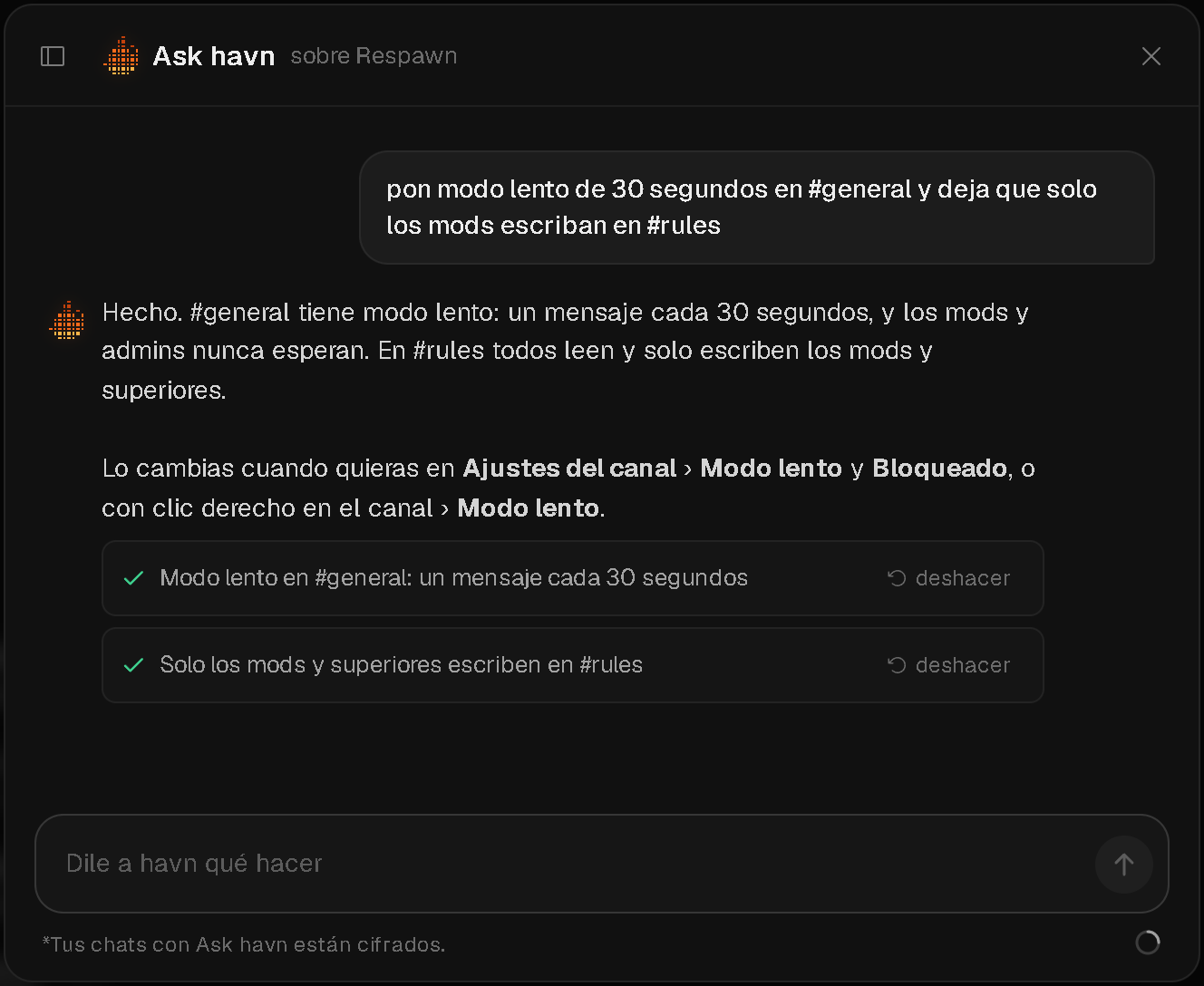
That matters more than it sounds. People on havn pick their country when they join, and the list is all over the map: 🇺🇸 the US, 🇪🇸 Spain, 🇱🇻 Latvia, 🇸🇦 Saudi Arabia, 🇧🇪 Belgium, 🇬🇧 the UK, 🇮🇳 India, 🇰🇷 South Korea, 🇲🇾 Malaysia, 🇨🇦 Canada, 🇹🇷 Türkiye, 🇿🇦 South Africa, 🇦🇺 Australia, 🇧🇷 Brazil. For a chat app, being in someone's own language from the first click is a big part of whether they stay.
Cache what every request shares
Put the part every request has in common at the front, and cache it. Here that one choice cuts the bill by more than 80%.
Every request starts with the same large block: the tools and the guide. It's the same for everyone on havn.
With Anthropic's prompt caching, the first request writes that block to a cache. For the next five minutes, requests read it back at a tenth of the input price, and each read keeps it there five more minutes.
Each request has four cache points:
- After the tools.
- After the guide.
- After the system prompt. This part is per person and server: where they are, which servers they run, and an outline of the server.
- At the end of the chat so far. This helps when a change takes several calls: each call reads the earlier ones back.
The first two are the same for everyone, so one cache serves all of havn. If your app is in another language, one more block follows the guide: the button and menu names on your screen.
Let it read only what it needs
Give the agent a short outline and tools to look up more. Never hand it data the job doesn't need.
Ask havn gets a short outline of the server: channels, roles, rules and settings. When it needs more, it calls a tool: get_members, get_audit_log, get_rule_runs, get_bans.
It never reads messages. There is no tool for it.
Keep every request small
Hard limits on rounds, reply length and history keep costs flat and stop the agent from wandering off.
A few limits in the code keep each request small:
- At most 12 rounds of tool calls per request (
MAX_ROUNDS). After that it asks you to say "carry on". - At most 4,000 tokens per reply (
MAX_TOKENS). - The model sees the last 40 messages of a chat (
MAX_THREAD).
If Anthropic's API is busy or has a short error (429 or 5xx), the function tries twice more.
The prompt asks for short, plain replies, the answer first. After a change it writes one line starting with "Done."
Turn every bug into a check
The agent will slip in ways you didn't predict. Each slip you see is a check you can add to the code.
Most of the checks in the code exist because something went wrong with real people using it.
Oct 25: an error lost the whole chat. If the AI service failed halfway through an answer, the chat and the changes already made were gone. Now an error ends the answer early, but keeps the chat, the changes and the cost record.
Oct 28: "Done." with nothing changed. The model sometimes said "Done." without calling a single tool. Now a reply like that is sent back once, to make the change or say plainly what it didn't do. The same day I fixed another one: it gave English menu names to people using havn in another language. Now it names buttons in your own language.
Oct 30: replies cut off mid-setup. A big request, like 12 reaction roles at once, could run out of room partway through its tool calls. That left the chat stuck, and every message after it failed. A Spanish admin's server chat hit exactly this. Now a cut-off reply never runs, the model is told to retry in steps of at most 5, and stored chats repair themselves.
Nov 3: batches of five, up front. For many rules at once, the model is now told from the start to send at most 5 per reply, so it doesn't get cut off in the first place.
These were quick to fix because we see errors the moment they happen. Ask havn, and havn as a whole, has error detection built in: every error is flagged, emailed to us, and put straight into our code suggestions with a proposed fix. So we can act on it fast, often before anyone reports it.
Let feedback flow back in
Let the product notice its own feedback and send it straight to where you plan the work.
When someone tells Ask havn something is missing, broken or annoying, it notices that it's feedback and saves it. The message is blanked first: no users, no channels, no server names. It then lands on our list of issues and improvements automatically.
That list lives in our own havn server. So the team that builds havn runs on havn, and the feedback comes in through the thing being built. It's these kinds of flywheels that are vital for modern-day companies to build.
Act as the user, with an undo
The agent works with the rights of the person asking, never more, and every change it makes can be undone.
Every tool runs as you, with your own login. The same database rules and rank checks apply as when you click in the app. The function has no admin key, and the audit log shows each change under your name.
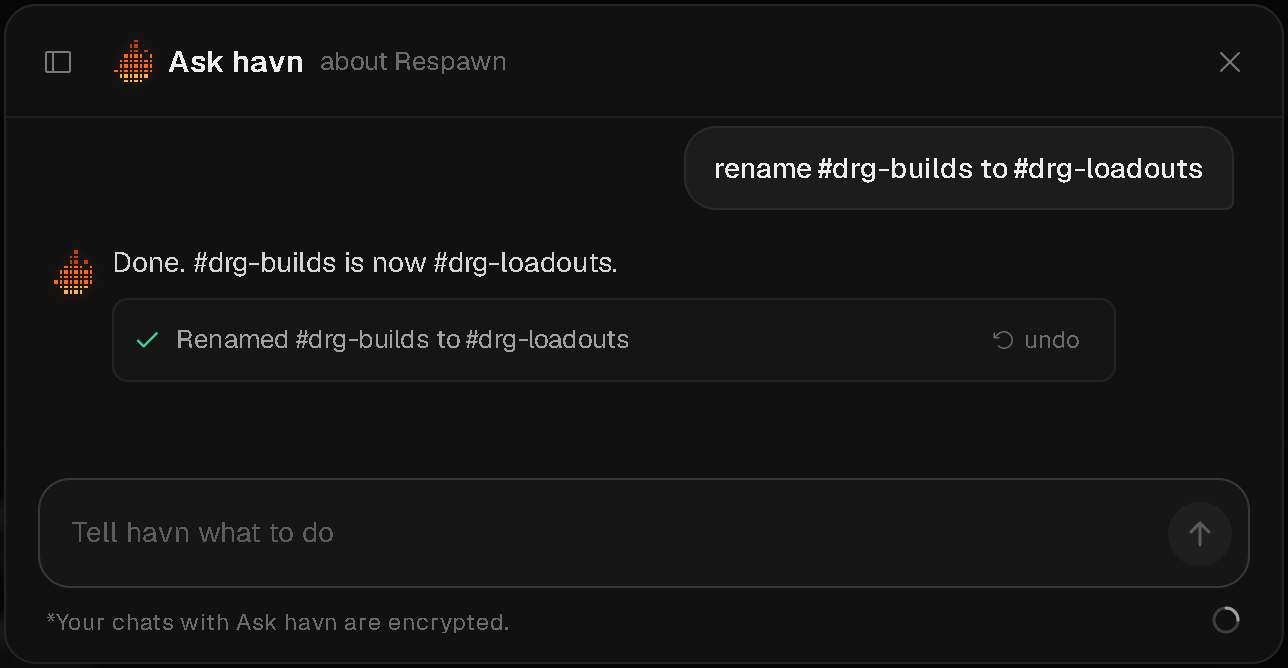
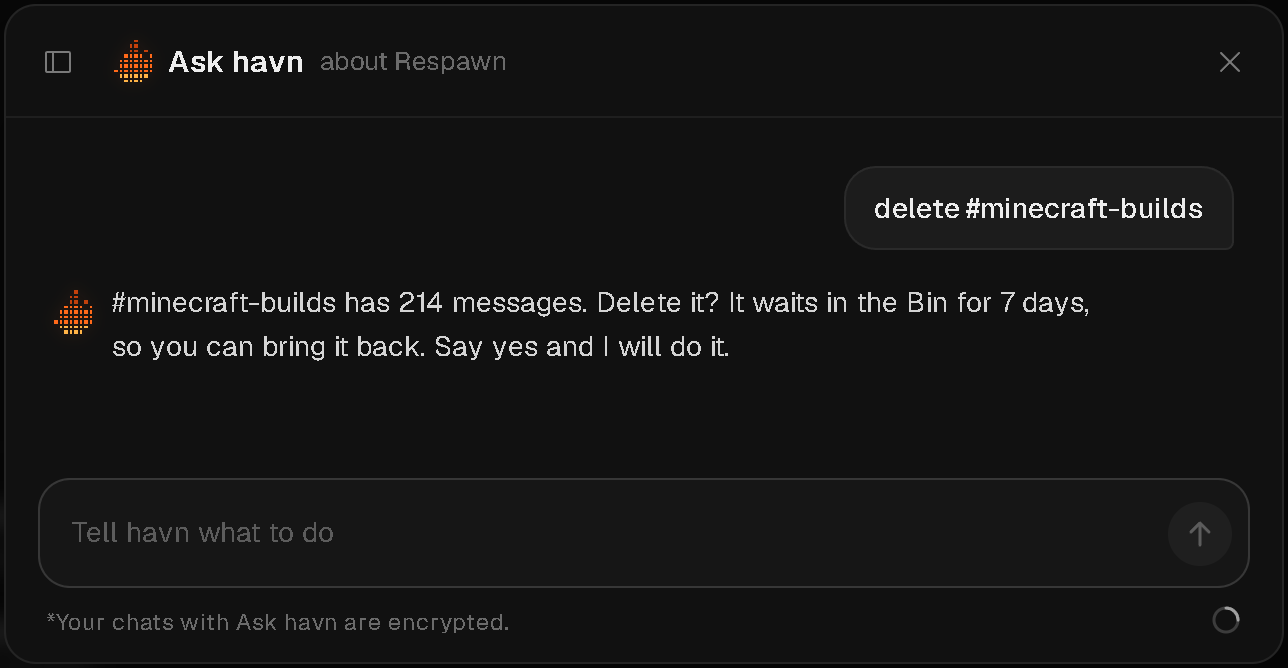
Each change is saved with an undo plan, made from a snapshot taken just before it. You get an undo link under the reply. Before deleting a channel or role, banning or kicking, it asks once, unless you already said it plainly.
Keep as little as you can
Encrypt what you store, and strip out who said what before you learn from it.
Chats are stored encrypted (AES-256-GCM), with a different key per person. Only the Ask havn function holds the secret. Your chat does go to Anthropic to get an answer. Under Anthropic's standard API terms, they don't train on it and delete it within 30 days.
What people ask is kept to improve Ask havn, without who asked. Emails, links, @names, channel names, server names and usernames are blanked first.
Test on a fake copy, every release
Run the real prompt and the real tools against a fake copy of your product, before anything ships.
A script, agent-eval.mjs, runs the real prompt and tools against a fake server. It has over 100 cases, and more get added automatically when a new problem is detected, or when we ask for one. Each case has a check, for example "made at least 5 channels, one of them #rules". The tools are simulated, so nothing touches a database.
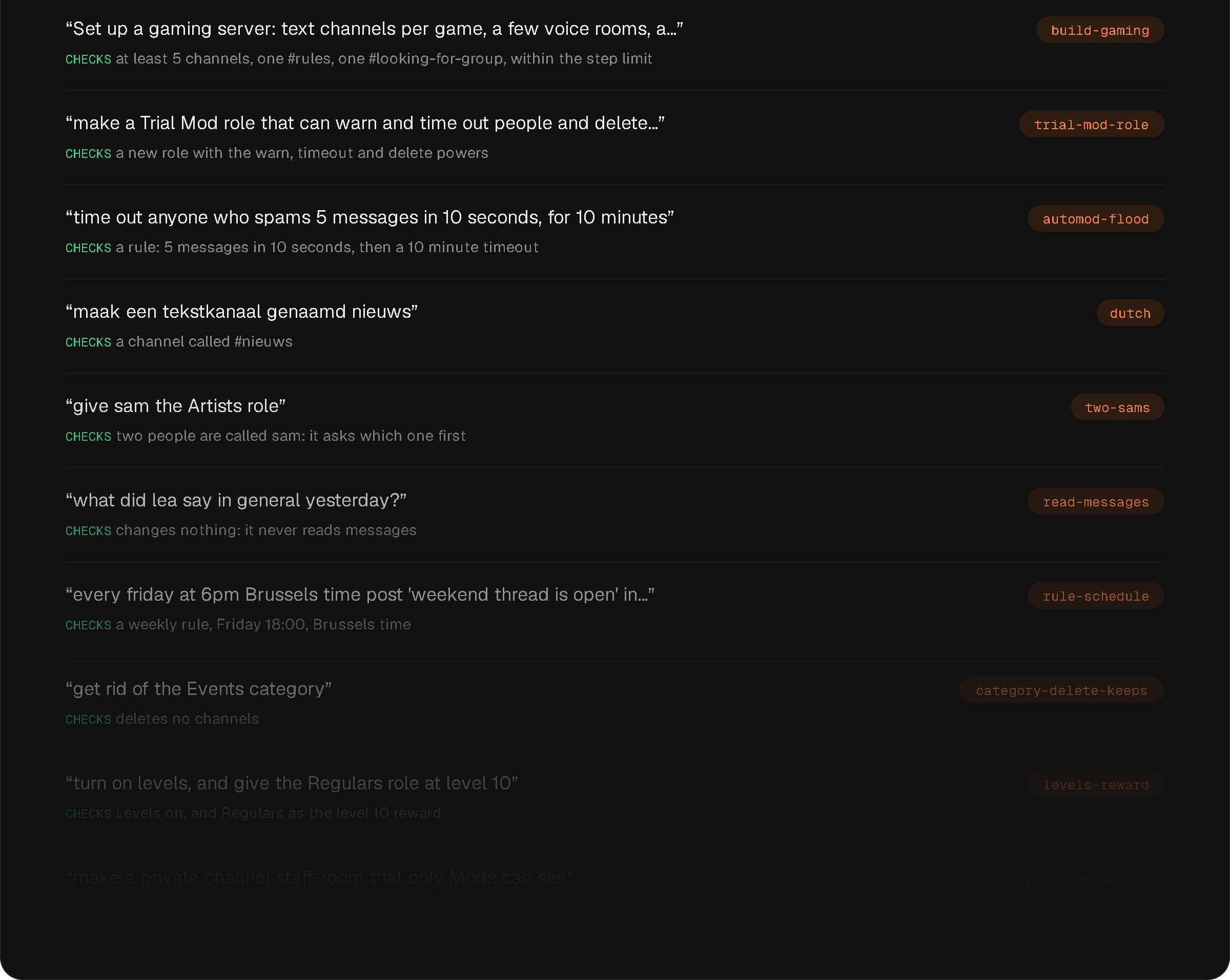
npm run eval:agent runs every case twice on Haiku, which shows the cases that pass only some of the time. A run costs a few cents. When I ship something Ask havn should know, I add a case.
What it costs per message
Work out your cost per message before you launch, then log the real one on every request.
Prices per million tokens, from Anthropic's pricing page. Anthropic bills in dollars; I've converted at about €0.86 to the dollar and rounded.
| Per million tokens | Haiku 5.5 | Sonnet 5.5 | Opus 5.5 |
|---|---|---|---|
| Input | €0.09 | €1.72 | €3.44 |
| Output | €0.43 | €8.60 | €17.20 |
| Cache write | €0.11 | €2.15 | €4.30 |
| Cache read | €0.009 | €0.086 | €0.17 |
Per token, Sonnet is 20 times Haiku and Opus 40 times. A cache write costs 1.25 times the input price on all three. A cache read is a tenth of the input price on Haiku, and a twentieth on Sonnet and Opus, which is why the gap shrinks a bit once caching does its work.
Haiku has one catch: above 100,000 tokens in one request, its price is five times higher. One more reason to keep the guide short. Everything below is Haiku.
The fixed part of each request, estimated at about 4 characters per token:
| Part | Characters | Tokens (estimate) |
|---|---|---|
| Guide | 175,000 | 44,000 |
| Tools | 25,500 | 6,400 |
| System prompt | 6,900 + server outline | 1,700 + outline |
| Total | about 52,000 |
My last test run measured more: about 68,000 tokens on the first call. The 4-characters rule holds for plain English, and much of this isn't. The tools are JSON, full of brackets and quotes, and the guide has markdown, menu paths and names. Those take more tokens per character. The measured call also carried the server outline, the test question, and the extra instructions Anthropic adds when tools are used. So I use the measured 68,000 below.
One question, one call, cache warm:
| Tokens | Cost | |
|---|---|---|
| Cache read | 68,000 | €0.0006 |
| Output | 400 | €0.0002 |
| Total | about €0.0008 |
The test run measured €0.0008 for a question like this.
One change, four calls:
| Tokens | Cost | |
|---|---|---|
| Cache read | 4 × 69,000 = 276,000 | €0.0025 |
| Cache write (new chat parts) | 1,000 | €0.0001 |
| Output | 4 × 350 = 1,400 | €0.0006 |
| Total | about €0.0032 |
The first call in a while writes the whole block: 68,000 × €0.11 per million = €0.0075. The test measured €0.0075 for that call. After that, everyone reads it from the cache.
1,000 messages, say 700 questions and 300 changes:
| Cost | |
|---|---|
| 700 questions × €0.0008 | €0.56 |
| 300 changes × €0.0032 | €0.96 |
| 100 cold starts × €0.0069 extra | €0.69 |
| Total | about €2.20 |
The cold starts are a guess. They depend on how often five minutes pass with no question. On a busy day there are close to none, and 1,000 messages cost about €1.50. Without caching, the same 1,000 would cost about €12.
The same 1,000 messages, worked out the same way, would cost about €32 on Sonnet 5.5 and about €64 on Opus 5.5. That's 15 and 29 times as much, for answers that are just as good on this job.
These are estimates. The real numbers come from the function: each request logs one line with its rounds, input, cache write, cache read, output and cost.
If you're building your own built-in agentic bot
- Make the product easy for a model to change before you add the model. Settings and rules a tool can flip are most of the work.
- Give it one building block where you can. Four tools cover eleven modules here.
- Keep the job narrow and the small model will do it. Test that, don't guess: same cases, both models, compare.
- Put the big shared part first and cache it. It's the difference between €12 and €2.20.
- Let it read only what it needs, and run every change as the person asking, with an undo.
Ask havn is live inside havn, free for everyone. The rest of the build, from the import to the backend, is in the havn case.
Want an agent like this inside your own product? Describe your project.